Most blockers only protect your phone—so you cheat on your laptop. Focussive coordinates focus sessions simultaneously across Android and Chrome, closing the escape routes with research-backed habit architecture.
A brief demonstration showing real-time mobile and Chrome extension synchronization, custom block rules, and the Driving Forces system.
Explore the deliberate, minimalist interface designed to protect mental bandwidth and eliminate impulsive screen time.
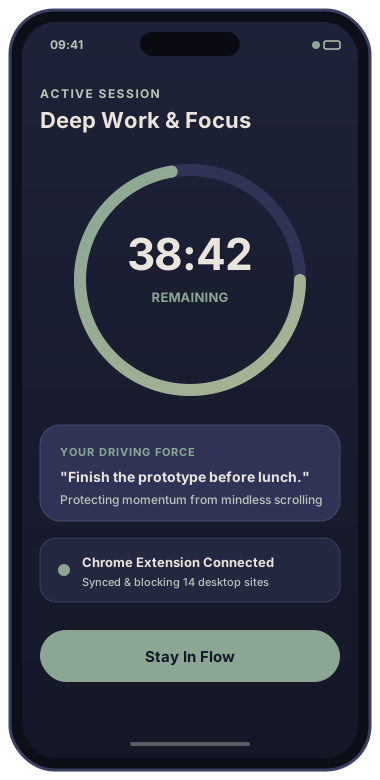
Every session presents an unobtrusive visual timer with progress pacing, active intentions, and persistent background status.
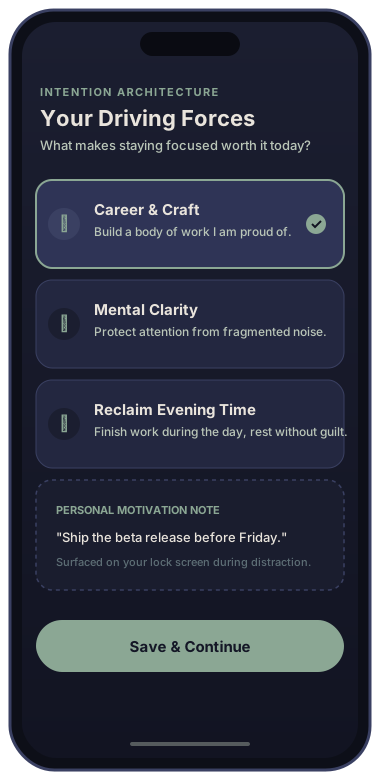
Willpower alone is fragile. Focussive asks you to define your underlying motivations before starting, transforming blunt blocking into purposeful self-regulation.
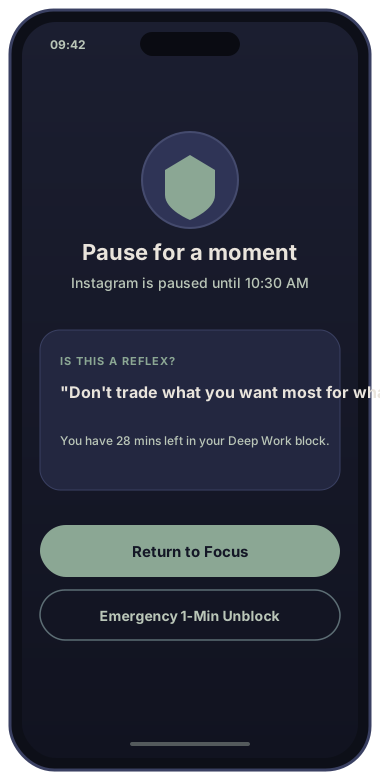
When you instinctively tap a blocked application, Focussive gently intercepts the reflex with a mindful pause instead of a jarring error.
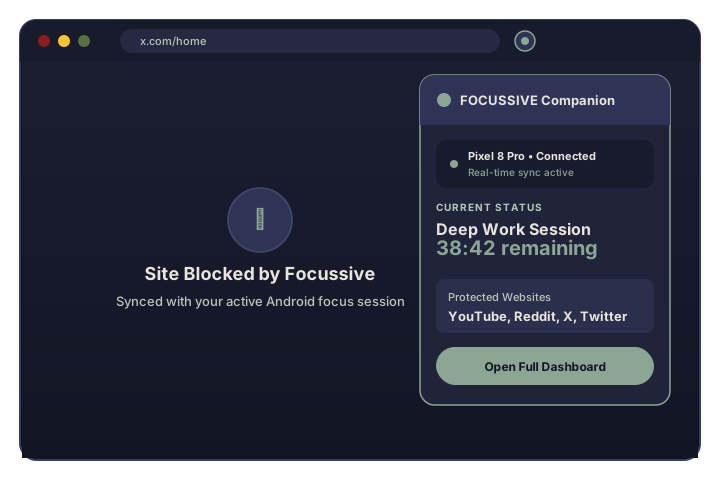
Pair your phone with your browser in seconds via QR code or a one-time secure PIN. One switch protects your entire digital workspace.
Focussive was built around peer-reviewed principles of attention management and habit formation, addressing the true psychological root causes of distraction.
Research by Dr. Gloria Mark and Dr. Sophie Leroy proves that switching to another screen leaves lingering attention residue, taking up to 23 minutes to regain deep focus. Focussive synchronizes all devices simultaneously to eliminate cross-device leaks.
Leroy (2009) • Mark (2014)Psychologist Peter Gollwitzer demonstrated that pre-committing to specific motivations and conditional plans significantly increases goal adherence. Focussive's "Driving Forces" activate deliberate agency when impulse strikes.
Gollwitzer et al.Impulsive screen pickups are automatic System 1 reflexes. Introducing purposeful, non-punitive friction pauses the subconscious impulse and re-engages deliberate prefrontal executive control (System 2).
Kahneman Dual-ProcessIn behavioral economics, pre-commitment devices protect your future self from predictable ego-depletion. Setting scheduled focus rules beforehand ensures high-performance follow-through.
Schelling / StrotzThree straightforward steps to reclaim your workday without complex configuration.
Select the mobile apps and desktop websites that fragment your attention. Organize them into custom groups tailored for study, deep work, or reading.
Scan a single QR code on your computer screen. Your phone and desktop browser are securely paired in real time with zero account friction.
Select your driving force and initiate your timer. Both your phone and your browser immediately enter protected focus mode together.
Everything you need to know about Focussive, device permissions, and the beta testing program.
Google Play requires testers to be added to an authorized closed testing group. Simply reach out via our Facebook page or support email with your Google Play account email, and you will receive an immediate test invitation link to install Focussive directly from Google Play.
Your privacy is central to our engineering. All app blocking checks and usage tracking happen 100% locally on your device using Android system APIs. We do not track, log, or transmit your app history, keystrokes, or personal browsing habits to any server. Read our full Privacy Policy for complete details.
Once you install Focussive and sign up, open the Settings tab, tap on "Redeem Voucher", and enter code SHIPATON26. This instantly unlocks three full months of Focussive Pro for free (limited to the first 50 beta participants).
The Chrome extension receives real-time session state via secure, lightweight WebSocket and push sync. Once a session begins, the blocking rules remain active on your browser for the full scheduled duration regardless of phone screen state.